# Đăng nhập phần mềm

### 1. Đăng nhập

Hướng dẫn cách đăng nhập phần mềm

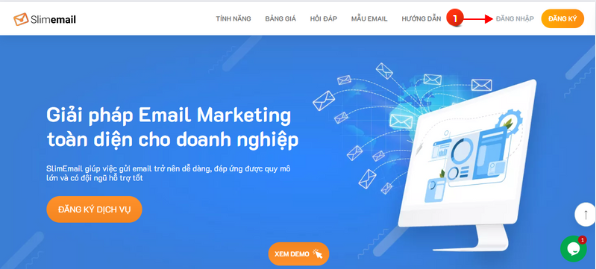
Trước hết, hãy vào trang chủ của SlimEmail và bấm nút **\[ Đăng nhập ]**

<figure><img src="https://920546444-files.gitbook.io/~/files/v0/b/gitbook-x-prod.appspot.com/o/spaces%2FJR9ah0bVTVw5rGT52nWP%2Fuploads%2Fe61RqlE4sX6nhecT5GLM%2FScreenshot_7.png?alt=media&#x26;token=04798960-958f-424f-a4b9-5c503b6f5f54" alt=""><figcaption></figcaption></figure>

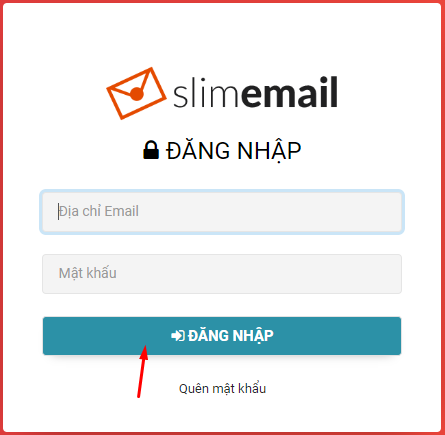
Sau đó nhập email và mật khẩu SlimEmail đã cung cấp cho bạn rồi bấm **\[ĐĂNG NHẬP]**

<figure><img src="https://920546444-files.gitbook.io/~/files/v0/b/gitbook-x-prod.appspot.com/o/spaces%2FJR9ah0bVTVw5rGT52nWP%2Fuploads%2FYneedsJJFENQBC3NhYdV%2Fdn.png?alt=media&#x26;token=58fe51fb-7096-46fa-aaf6-402e04fc586c" alt=""><figcaption></figcaption></figure>

**Lưu ý:** nếu phần mềm báo thông tin đăng nhập sai thì hãy kiểm tra lại, có thể bạn đã copy thừa khoảng trắng
---

# Agent Instructions: Querying This Documentation

If you need additional information that is not directly available in this page, you can query the documentation dynamically by asking a question.

Perform an HTTP GET request on the current page URL with the `ask` query parameter:

```
GET https://help.slimemail.vn/start/dang-nhap-phan-mem.md?ask=<question>
```

The question should be specific, self-contained, and written in natural language.
The response will contain a direct answer to the question and relevant excerpts and sources from the documentation.

Use this mechanism when the answer is not explicitly present in the current page, you need clarification or additional context, or you want to retrieve related documentation sections.
